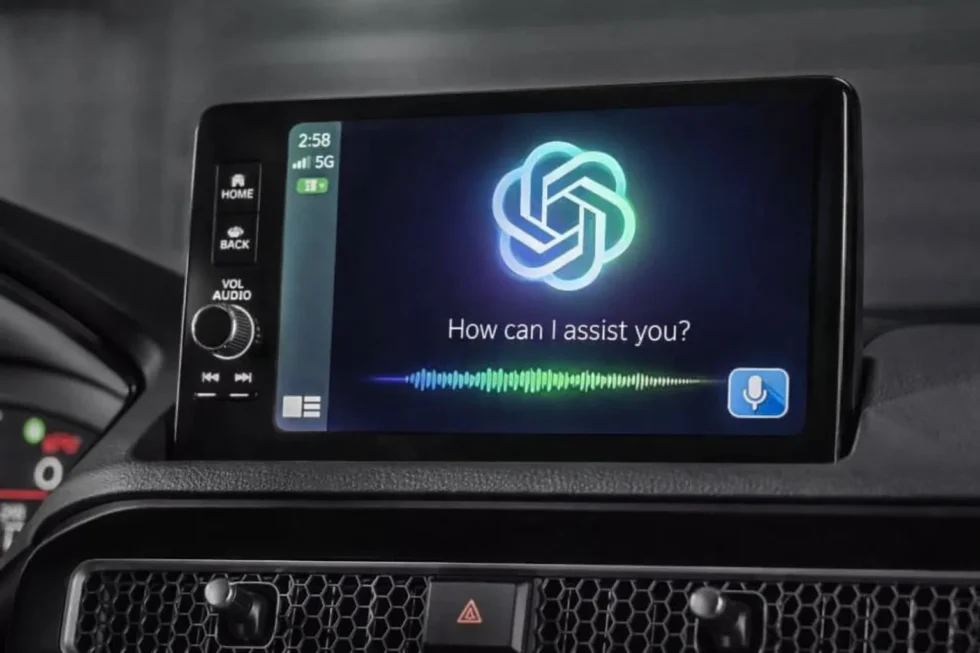
The automotive technology landscape has reached a pivotal milestone as OpenAI officially integrates ChatGPT Voice Mode into Apple CarPlay, effectively bringing advanced conversational intelligence to the vehicle dashboard for the first time. As of April 2, 2026, this rollout marks a significant expansion of the ChatGPT ecosystem, allowing millions of drivers to engage in hands-free brainstorming, language practice, and complex querying without diverting their attention from the road.
The integration, which requires iOS 26.4 or later, signifies a shift in how third-party AI assistants are permitted to operate within Apple’s historically closed ecosystem, offering a proactive tool for productivity during commutes while strictly adhering to safety-first protocols that prioritize audible interactions over visual distraction. As reported by The WP Times , via OpenAI.
The 2026 Regulatory Framework: Voice-Only Safety Standards
Under the new Automotive AI Safety Guidelines adopted by Apple in late 2025, third-party conversational apps like ChatGPT are subject to a "Voice-Mainstream" interaction rule. This means the CarPlay version of the app is stripped of all text-based displays and images, ensuring that the driver’s eyes remain on the road. When the app is active, the dashboard displays only a simplified wave-form or "listening" icon and basic controls for muting or ending the session.
This design prevents the "hallucination risk" from being compounded by visual reading tasks, a critical safety measure as AI agents become more prevalent in high-stakes environments like driving.
- Software Prerequisite: iPhone must be running iOS 26.4 or higher to unlock the third-party AI entitlement.
- Visual Restriction: Zero-text interface; responses are delivered exclusively via high-fidelity text-to-speech.
- Data Controls: Optional location sharing allows for localized news and weather queries, though this is disabled by default.
- Hardware Dependency: Audio quality and responsiveness are tied to the vehicle's internal microphone and echo-cancellation hardware.
ChatGPT is now available in CarPlay.
— OpenAI (@OpenAI) April 2, 2026
The voice mode you know, now available on-the-go.
Rolling out to iPhone users running iOS 26.4+ where CarPlay is supported. https://t.co/aXQqH9MNuG pic.twitter.com/yk3qdLa99r
Operational Comparison: ChatGPT vs. Apple Siri in 2026
Despite the integration, there is a clear legal and functional divide between ChatGPT and Siri within the CarPlay environment. While ChatGPT excels at open-ended dialogue and creative tasks, it currently lacks the "entitlements" to control vehicle hardware or access deep system functions. According to the Apple Developer Documentation (April 2026 update), third-party AI apps cannot adjust cabin temperature, interact with the vehicle’s CAN bus (Controller Area Network), or send iMessages.
Siri remains the exclusive gateway for these "control-tier" tasks, positioning ChatGPT as a purely informational and conversational companion.
| Feature / Capability | ChatGPT Voice (CarPlay) | Apple Siri (Native) |
| Wake Word Activation | No (Manual tap required) | Yes ("Siri" / "Hey Siri") |
| Vehicle Control (AC/Windows) | No | Yes |
| Complex Brainstorming | High Capability | Moderate |
| Navigation & Live Traffic | No | Yes (Apple Maps) |
| Third-Party App Control | Limited (Box/Notion sync) | Wide Ecosystem Control |
| Language Practice | Advanced (Multi-lingual) | Basic Translation |
Step-by-Step Installation and Activation Guide
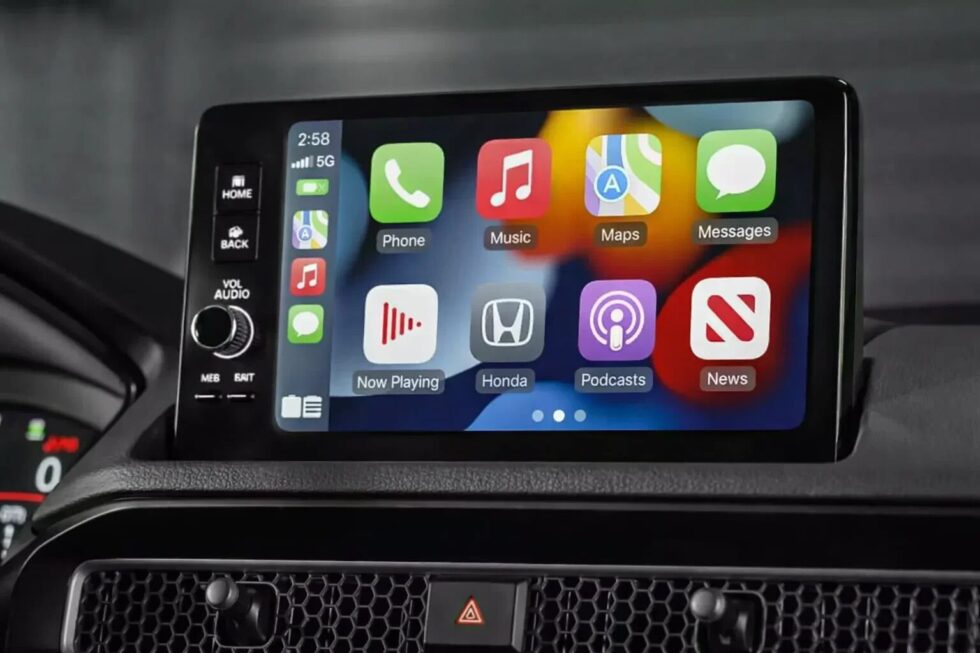
To utilize ChatGPT in your vehicle, your iPhone must be running iOS 26.4 or later, and you must have the most recent version of the ChatGPT app from the App Store. The installation does not require a separate "CarPlay app"; instead, once the iPhone app is updated, the ChatGPT icon will automatically appear in your CarPlay dashboard's app grid. For the most seamless experience, it is recommended to authorize all microphone and location permissions on the iPhone before connecting it to the vehicle for the first time.
- Software Update: Navigate to Settings > General > Software Update and ensure you are on iOS 26.4 or higher.
- App Update: Visit the App Store and update the ChatGPT app to the April 2026 version.
- Physical Connection: Connect your iPhone to your car via USB or Wireless CarPlay.
- Dashboard Selection: Tap the ChatGPT icon on your car's touchscreen to launch the interface.
- Voice Initiation: Select "New Voice Chat" and wait for the status to change from "Connecting" to "Listening."
Practical Integration: Setting Up ChatGPT for the Commute
To maximize the utility of ChatGPT in the car, users must navigate a specific setup process to enable the "Start automatically in CarPlay" feature. This setting, found within the ChatGPT iOS app under Settings > Voice, allows the interface to bypass the standard chat history screen and enter "Listening" mode immediately upon launch from the car's dashboard.
For professional users, this creates a seamless transition from a desktop "Project" or "Custom GPT" to a mobile voice session, enabling the review of meeting notes or the drafting of emails while in transit, provided the user relies entirely on verbal dictation.
- Update Requirement: Ensure both the ChatGPT app and iOS (v26.4+) are at the latest version.
- Initial Connection: Connect the iPhone via USB or Wireless CarPlay; the ChatGPT icon will appear on the second or third home screen.
- Active Sessions: Tap "New Voice Chat" to start a fresh dialogue or select a "Pinned" chat to resume a project.
- Hands-Free Setting: Enable "Start automatically in CarPlay" on the iPhone to reduce manual taps.
- Safety Protocol: Always complete initial app authorization and location sharing settings while the vehicle is in Park.
Future Outlook: WWDC 2026 and the iOS 27 Roadmap
The timing of this rollout is particularly strategic, occurring just weeks before the anticipated announcement of iOS 27 at Apple’s Worldwide Developers Conference (WWDC) in June 2026. Industry analysts suggest that Apple’s decision to open CarPlay to OpenAI is a "litmus test" for a broader AI orchestration layer where Siri could eventually act as a broker between different LLMs.
By observing how drivers interact with ChatGPT in a restricted voice-only mode, Apple can refine its own "Private Cloud Compute" models to compete with or better integrate with third-party giants, potentially leading to a 2027 update where wake-word activation is finally granted to non-Apple assistants.
- Contextual Awareness: Future updates may allow ChatGPT to "hear" background noise (like rain or traffic) to offer relevant advice.
- Siri Brokerage: Rumors suggest iOS 27 will allow users to say, "Siri, ask ChatGPT to summarize my latest Notion doc."
- Market Pressure: Android Auto is expected to respond with a similar native Gemini integration by late 2026.
- Privacy Evolution: OpenAI’s "Data Controls" now allow for local-only processing for certain basic voice tasks to reduce latency.
Frequently Asked Questions: ChatGPT Voice in Apple CarPlay (2026)
How do I activate ChatGPT Voice in my car without touching the screen?
As of April 2026, Apple maintains strict control over "wake word" triggers. While you can use Siri to perform system tasks, you must manually tap the ChatGPT icon on your CarPlay dashboard to initiate a session. Once the app is open and "Listening" mode is active, the conversation is entirely hands-free.
Does ChatGPT replace Siri for controlling vehicle functions?
No. ChatGPT operates as a high-level conversational layer. It does not have the system entitlements required to adjust climate control, open windows, or access the vehicle's CAN bus. Siri remains the primary assistant for all hardware-related and native Apple app commands (like iMessage or Apple Maps).
What are the minimum software requirements for this integration?
To access the native CarPlay interface for ChatGPT, your iPhone must be updated to iOS 26.4 or higher. Additionally, you must be running the April 2026 version (or later) of the ChatGPT app.
Can ChatGPT provide real-time GPS navigation while I drive?
ChatGPT cannot provide turn-by-turn navigation. While it can suggest points of interest based on your general location (if permissions are granted), it does not have an integrated mapping engine. For active routing, you must continue to use Apple Maps, Google Maps, or Waze.
Is my conversation history saved when using the CarPlay mode?
Yes. By default, your voice-to-text transcripts are synced to your OpenAI account. However, you can enable "Temporary Chat" mode within the mobile app settings before connecting to CarPlay if you prefer that the session is not saved to your history.
Read about the life of Westminster and Pimlico district, London and the world. 24/7 news with fresh and useful updates on culture, business, technology and city life: Apple WWDC 2026: iOS 27, Liquid Glass & The Gemini-Powered Siri Revolution